Ford Focus Radio Code – Unlock Your Stereo from the Serial
Focus stereo showing CODE after a battery change? Enter the radio serial number to get the original 4-digit code for any Focus from 1998 to 2011.

Paid service: the price for your country is shown before you pay, right after we identify your radio. No subscription, refund if the code does not work.
Serial number location
The serial number is unique for each radio. Select the model of your radio to see the exact location.
The model is written somewhere on the front of the radio.
Serial number location
Select your 6000 CD radio model
Serial number location
Use the four extraction holes to remove the radio. Find the serial number on the label attached to the side of the radio.
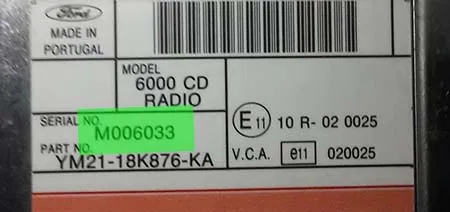
Serial number location
Turn on the radio and hold buttons 1 and 6 for three seconds. Different information appears on the screen; the serial number appears last, in this format: V + 6 digits. Example: V123002
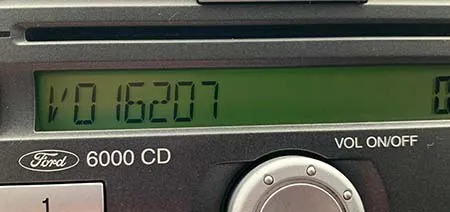
For some units the serial number does not appear on the screen.
Serial number location
For some units the serial number does not show up on the screen, so you have to use the four extraction holes to remove the unit. Find the serial number on the label attached to the case. It begins with M or V followed by 6 digits.
Serial number location
Turn on the radio and hold buttons 1 and 6 for three seconds. Different information appears on the screen; the serial number appears last, in this format: V + 6 digits. Example: V123002
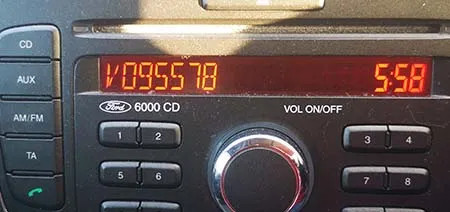
Serial number location
Select your Sony radio model
Serial number location
Use the four extraction holes to remove the radio. Find the serial number on the label attached to the side of the radio.
Serial number location
Turn on the radio and hold buttons 1 and 6 for three seconds. Different information appears on the screen; the serial number appears last, in this format: V + 6 digits. Example: V123002
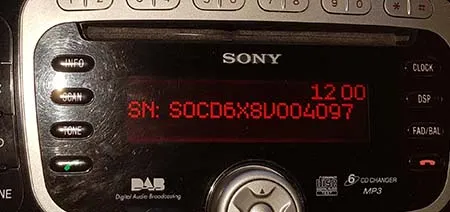
Serial number location
Turn on the radio and hold buttons 2 and 6 for three seconds. The serial appears on screen in this format: M123002
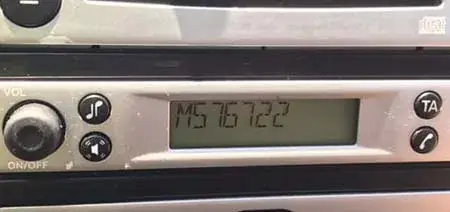
Serial number location
Use the four extraction holes to remove the radio. Find the serial number on the label attached to the side of the radio. The serial number starts with C7 or BP. Examples:
- C7E3F0547 A 3298722
- BP1201A1991012
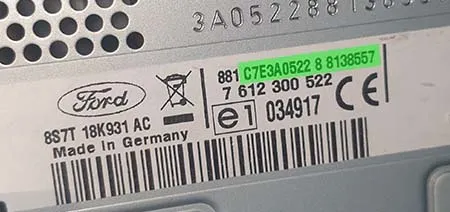
Serial number location
Use the four extraction holes to remove the radio. Find the serial number on the label attached to the side of the radio.
Why your Focus stereo asks for a code
Every factory radio in the Ford Focus has an anti-theft lock. When the car loses power – a flat or replaced battery, a jump start or work on the electrics – the stereo locks and shows CODE until the original 4-digit code is entered.
The code card is usually in the owner's manual wallet, but on older or second-hand cars it is often missing. The code belongs to the radio's own serial number, not to the car, so you can recover it from the serial alone – no dealer visit needed.
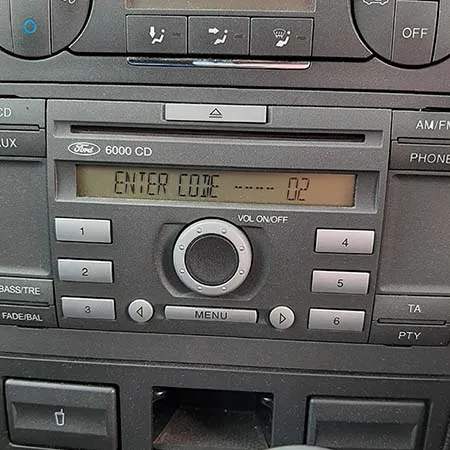
Which radio is in your Focus?
| Generation | Common factory stereos | Serial starts with | How to see the serial |
|---|---|---|---|
| Focus Mk1 (1998–2004) | 4500 RDS EON (cassette), 6000 CD RDS EON | M + 6 digits | Hold 2 + 6 on the 4500 RDS; 6000 CD RDS EON: label on the case |
| Focus Mk2 (2004–2008) | 6000 CD, Sony CD | V + 6 digits (some early units M) | Hold 1 + 6 with the radio on |
| Focus Mk2 facelift (2008–2011) | 6000 CD, Sony CD/MP3 | V + 6 digits | Hold 1 + 6 with the radio on |
| Focus Mk2 with navigation | Blaupunkt TravelPilot FX | BP… or C7… | Label on the unit (must be removed) |
| Focus Mk3 (2011 onwards) | SYNC / Ford audio | – | Most do not ask for a radio code |
Searching for a "Ford Focus 2008 radio code"? 2008 cars can have either the earlier or the facelift stereo – the serial on your unit tells you which, and both are supported.
How to unlock your Focus radio
- Show the serial. Switch the ignition and the radio on (it shows CODE). Hold buttons 1 and 6 together – or 2 and 6 on the 4500 RDS cassette unit – for about 3 seconds. Several codes scroll past; the serial starts with M or V. Film the screen with your phone if it goes by too fast.
- No serial on screen? Older units (before 2004) often don't display it. Remove the stereo with four Ford radio release keys and read the serial from the barcode label on the case.
- Get the code. Enter the serial in the box at the top of this page. The price for your country is shown before you pay and the code appears on the page right after payment.
- Enter the code. Press button 1 as many times as the first digit, button 2 for the second, 3 for the third and 4 for the fourth. Then press and hold 5 until the radio starts playing.
Before you start
- Don't guess: after a wrong code the radio shows WAIT; after 10 wrong codes it shows LOCKED.
- If the stereo was swapped from another car, the old code card won't work. Always use the serial from the radio in your dashboard.
- Write the code down and keep it with the car documents for the next battery change.
Frequently asked questions
Can I get my Focus radio code from the VIN or registration?
My Focus stereo shows LOCKED10. What now?
Is the Focus radio code free from Ford?
Customer reviews
Alex · IT
Fast , simple and precise thanks
Alejandro G. · ES
Simple, effective and cheap! Love it
Tjesse R
I tried this site and it worked 100% correctly on my radio! Ford dealer told me he also can provide for free visiting them, but having the option to receive the code via Internet, with a fast response time is ideal. Thank you so much for such a great service!