Ford Radio Locked or Code Not Working?
Find out what your display means and how to unlock the radio safely. Need the code? Enter the radio serial number above.

Paid service: the price for your country is shown before you pay, right after we identify your radio. No subscription, refund if the code does not work.
Serial number location
The serial number is unique for each radio. Select the model of your radio to see the exact location.
The model is written somewhere on the front of the radio.
Serial number location
Select your 6000 CD radio model
Serial number location
Use the four extraction holes to remove the radio. Find the serial number on the label attached to the side of the radio.
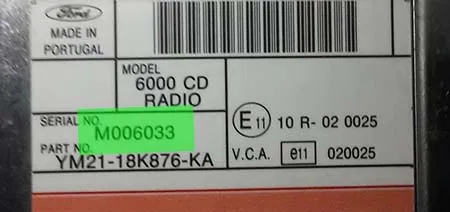
Serial number location
Turn on the radio and hold buttons 1 and 6 for three seconds. Different information appears on the screen; the serial number appears last, in this format: V + 6 digits. Example: V123002
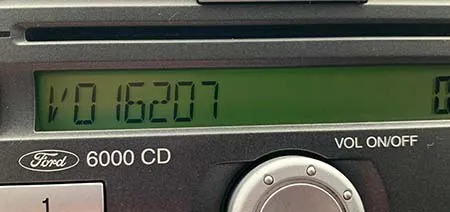
For some units the serial number does not appear on the screen.
Serial number location
For some units the serial number does not show up on the screen, so you have to use the four extraction holes to remove the unit. Find the serial number on the label attached to the case. It begins with M or V followed by 6 digits.
Serial number location
Turn on the radio and hold buttons 1 and 6 for three seconds. Different information appears on the screen; the serial number appears last, in this format: V + 6 digits. Example: V123002
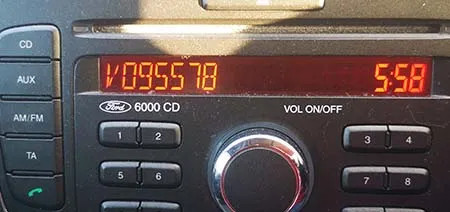
Serial number location
Select your Sony radio model
Serial number location
Use the four extraction holes to remove the radio. Find the serial number on the label attached to the side of the radio.
Serial number location
Turn on the radio and hold buttons 1 and 6 for three seconds. Different information appears on the screen; the serial number appears last, in this format: V + 6 digits. Example: V123002
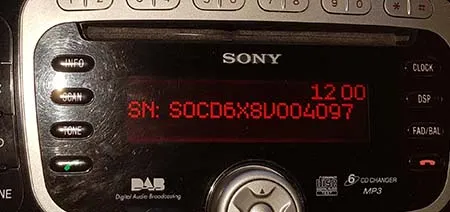
Serial number location
Turn on the radio and hold buttons 2 and 6 for three seconds. The serial appears on screen in this format: M123002
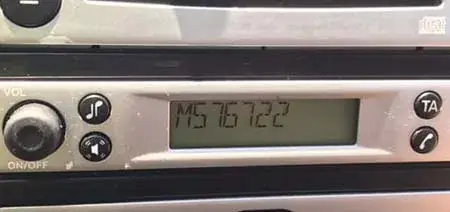
Serial number location
Use the four extraction holes to remove the radio. Find the serial number on the label attached to the side of the radio. The serial number starts with C7 or BP. Examples:
- C7E3F0547 A 3298722
- BP1201A1991012
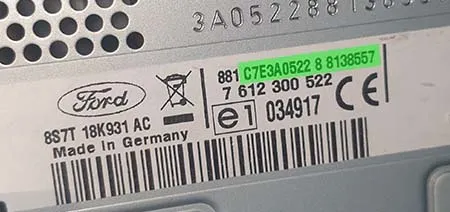
Serial number location
Use the four extraction holes to remove the radio. Find the serial number on the label attached to the side of the radio.
Why Ford radios lock
Every factory Ford radio has anti-theft protection. When it loses power – battery change, flat battery, jump start or electrical work – it asks for its 4-digit code before it plays again.
To stop thieves guessing, each wrong code makes the radio wait longer, and after too many it locks completely. Most locked radios can still be saved if you stop guessing and follow the steps below.
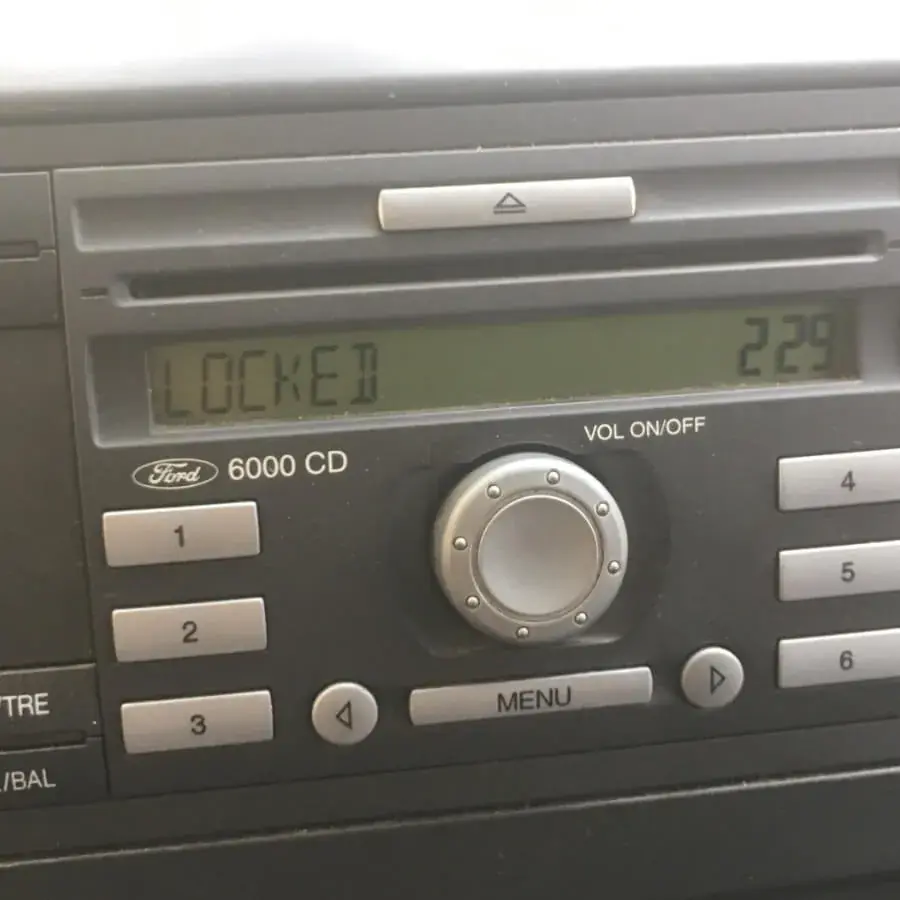
What your radio display means
| Display | What it means | What to do |
|---|---|---|
| CODE / KEYCODE | The radio lost power and is waiting for its 4-digit code. | Enter the code as shown in the steps below. |
| WAIT | A wrong code was entered. The radio blocks new attempts for a while. | Leave the radio switched on with the ignition on for about 30 minutes, until CODE appears again. |
| LOCKED / LOCKED10 | 10 wrong codes were entered. | On many units, hold button 6 while switching the radio on to get three more attempts. Use them only with the correct code. |
| LOCKED13 | All attempts are used up. | The radio can no longer be unlocked with a code. It needs reprogramming by a car electronics specialist or a Ford dealer. |
| Code accepted, but asked for again after every stop | The radio is losing its permanent power supply. | The code is right. Have the battery terminals and the radio's permanent-power fuse checked. |
Messages and waiting times differ slightly between radio generations.
How to enter the code correctly
- Ignition on. Run the engine or make sure the battery is well charged, then switch the radio on. Wait until it shows CODE (not WAIT).
- Set the digits. Press button 1 until the first digit is right, button 2 for the second, button 3 for the third and button 4 for the fourth.
- Check, then confirm. Read all four digits on the display, then press and hold button 5 until the radio accepts the code.
- Navigation systems. On units such as TravelPilot, enter the code with the rotary knob or the on-screen keypad and confirm with OK.
Why a code can be rejected
- It belongs to another radio. If the radio was ever replaced, the card in the car is for the old unit. The code must come from the serial of the radio fitted now.
- The serial was misread. O and 0 or I and 1 are easy to mix up, and M and V serials give different codes. Read it again with buttons 1 + 6 (2 + 6 on the 4500 RDS).
- It came from a free generator. Many free calculators give wrong codes for newer serials, and every wrong code costs an attempt.
- The battery is weak. If the voltage drops during entry, the radio can reset. Keep the engine running.
Frequently asked questions
Does disconnecting the battery reset LOCKED?
How long do I have to wait after WAIT?
Does the code change after a battery change?
What if the code from fordradiocode.eu does not work?
Customer reviews
Alex · IT
Fast , simple and precise thanks
Alejandro G. · ES
Simple, effective and cheap! Love it
Tjesse R
I tried this site and it worked 100% correctly on my radio! Ford dealer told me he also can provide for free visiting them, but having the option to receive the code via Internet, with a fast response time is ideal. Thank you so much for such a great service!