Ford Sanyo Radio Code from the 12-Digit Serial
Ford Sanyo, SAM or Panasonic radio showing CODE? Enter the 12-digit serial number from the label to get the original 4-digit code.

🎁 Black November: every code only 4.99 € all November. No subscription, refund if the code does not work.
Serial number location
The serial number is unique for each radio. Select the model of your radio to see the exact location.
The model is written somewhere on the front of the radio.
Serial number location
Select your 6000 CD radio model
Serial number location
Use the four extraction holes to remove the radio. Find the serial number on the label attached to the side of the radio.
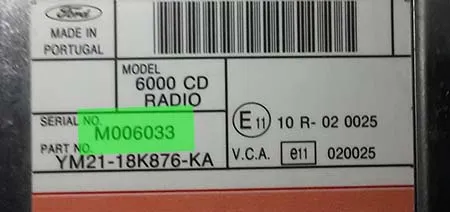
Serial number location
Turn on the radio and hold buttons 1 and 6 for three seconds. Different information appears on the screen; the serial number appears last, in this format: V + 6 digits. Example: V123002
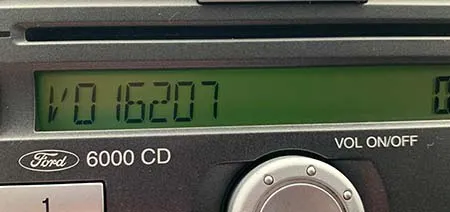
For some units the serial number does not appear on the screen.
Serial number location
For some units the serial number does not show up on the screen, so you have to use the four extraction holes to remove the unit. Find the serial number on the label attached to the case. It begins with M or V followed by 6 digits.
Serial number location
Turn on the radio and hold buttons 1 and 6 for three seconds. Different information appears on the screen; the serial number appears last, in this format: V + 6 digits. Example: V123002
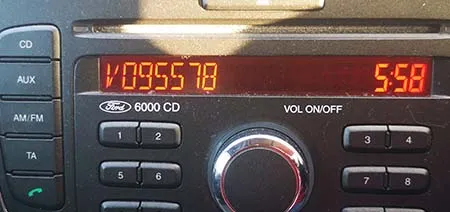
Serial number location
Select your Sony radio model
Serial number location
Use the four extraction holes to remove the radio. Find the serial number on the label attached to the side of the radio.
Serial number location
Turn on the radio and hold buttons 1 and 6 for three seconds. Different information appears on the screen; the serial number appears last, in this format: V + 6 digits. Example: V123002
Serial number location
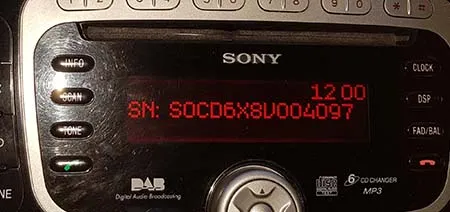
Turn on the radio and hold buttons 2 and 6 for three seconds. The serial appears on screen in this format: M123002
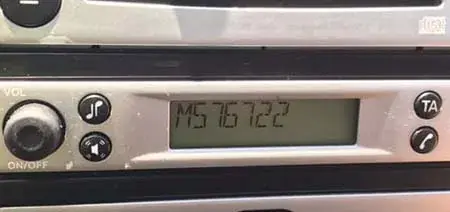
Serial number location
Use the four extraction holes to remove the radio. Find the serial number on the label attached to the side of the radio. The serial number starts with C7 or BP. Examples:
- C7E3F0547 A 3298722
- BP1201A1991012
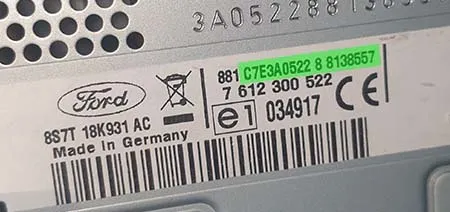
Serial number location
Use the four extraction holes to remove the radio. Find the serial number on the label attached to the side of the radio.
Ford radios made by Sanyo
Many Fords sold in Australia, Asia and India from about 2004 – the Focus, Fiesta and Figo among them – left the factory with a CD radio made by Sanyo Automedia in Malaysia. The label may say Sanyo, SAM, Panasonic or FMS Audio, with a model number such as 14790920 and a Ford part number such as 5M5T-18C815-AC.
Like other Ford stereos it locks after a battery change and shows CODE. The code belongs to the radio's own 12-digit serial number, so you can recover it without the code card or a dealer visit.
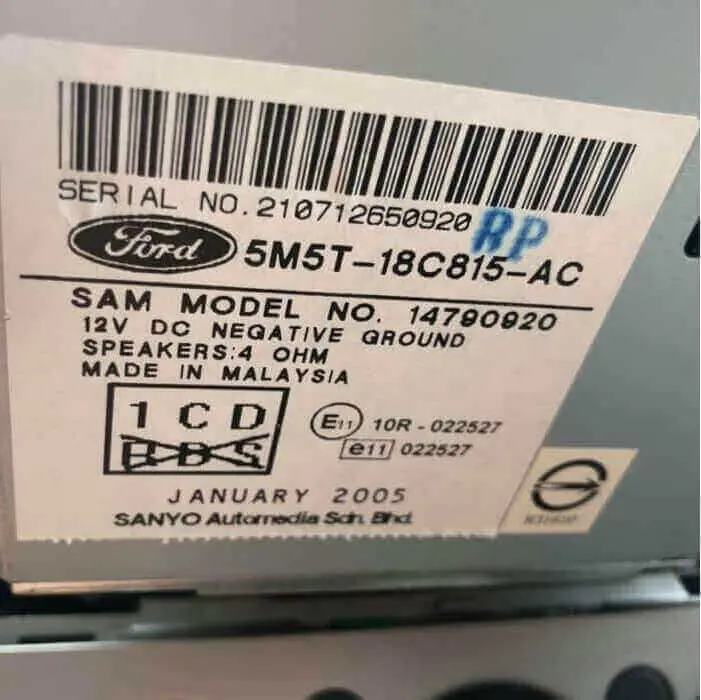
Which Sanyo radio do you have?
| Ford part number on the label | Seen in | Serial | Where to find it |
|---|---|---|---|
| 5M5T-18C815-… (SAM 147909xx) | Focus Mk2, from 2005 | 12 digits | Label on the case – the radio must be removed |
| 9M5T-18C939-… | Focus, from 2009 | 12 digits | Label on the case |
| 8A39-18C939-… (SAM 14790945) | Fiesta, 2009–2011 | 12 digits | Label on the case |
| SAM 14790965 | Figo | 12 digits | Label on the case |
The last four digits of the serial are usually the same as the end of the SAM model number on the same label (model 14790920 → serial ending …0920) – a quick way to check you copied the right number.
How to unlock a Ford Sanyo radio
- Find the serial. Sanyo units don't show their serial on the screen. It is printed on the label on the radio case, next to "SERIAL NO.", so the radio has to come out – with radio release keys or by taking off the trim around it, depending on the car.
- Check the number. The serial has exactly 12 digits. 10, 11, 13 or 14 digits mean one was missed or read twice – count again.
- Get the code. Enter all 12 digits in the box at the top of this page. The price (4.99 €) is shown before you pay and the code appears straight after.
- Enter the code. With CODE on the display, press button 1 until the first digit shows, button 2 for the second, 3 for the third and 4 for the fourth, then press and hold 5 – the usual way on Ford radios. If your unit works differently, the owner's manual shows its buttons.
Before you start
- Don't guess: a wrong code makes the radio show WAIT. Leave the ignition and the radio on until CODE comes back, then try again carefully. See Ford radio locked for WAIT, LOCKED and LOCKED 13.
- If the radio came from another car, the old code card won't work. Always use the serial on the radio in your dashboard.
- Write the code down and keep it with the car documents for the next battery change.
Frequently asked questions
My radio shows CODE but no serial on the screen. Where is it?
The label says SAM, Panasonic or FMS Audio, not Sanyo. Is it the same?
Can I get the code from the VIN or registration?
My serial has 10, 11, 13 or 14 digits. What now?
Customer reviews
I tried this site and it worked 100% correctly on my radio! Ford dealer told me he also can provide for free visiting them, but having the option to receive the code via Internet, with a fast response time is ideal. Thank you so much for such a great service!
Tjesse R
★★★★★Took my car into the garage today and when it was returned with radio blocked and the keycode on my manual didn't match the stereo even with it being a ford stock stereo for my model. This website is very useful as it gave me the working keycode.
Josh Wade
★★★★★Simple, effective and cheap! Love it